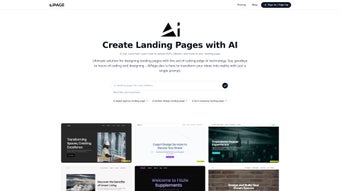

Download AIPage – AI‑Powered Medical Landing Page Generator, Free & Secure
Overview
AIPage is a purpose‑built, AI‑driven landing page generator designed exclusively for the medical sector. It enables doctors, clinics, hospitals, and health‑tech startups to launch professional‑looking landing pages in minutes, without the need for deep design expertise or lengthy development cycles. By harnessing advanced natural‑language processing and template‑based design, AIPage translates simple input—such as service descriptions, contact details, and branding guidelines—into responsive, SEO‑friendly web pages that meet strict healthcare compliance standards. The platform is open‑source, inviting developers to contribute, extend, and tailor the codebase to fit unique workflow requirements while benefiting from a community that continuously refines the AI models and UI components. Whether you need a quick promotional page for a new telemedicine service or a comprehensive information hub for a specialty clinic, AIPage offers a fast, secure, and cost‑effective solution that eliminates the bottlenecks traditionally associated with web development in the healthcare space.
Beyond speed, AIPage addresses critical concerns for medical marketers: data privacy, regulatory compliance, and search visibility. Each generated page is built with clean, semantic HTML that includes proper heading hierarchy, ARIA attributes, and schema.org markup for medical services. This not only improves accessibility for patients using assistive technologies but also signals relevance to search engines, helping providers rank higher for condition‑specific queries. Security is baked into the workflow; the tool never stores patient data on its servers, and all processing occurs locally or within a secure Docker container, ensuring that sensitive information stays under the control of the healthcare organization. In addition, the community‑driven roadmap prioritizes features like HIPAA‑compliant analytics, multilingual support, and integration with popular EMR platforms, making AIPage a future‑proof choice for forward‑looking health providers.
Core Features & Benefits
- Medical‑Focused Templates: Pre‑designed layouts that adhere to HIPAA‑friendly privacy considerations and incorporate common healthcare UI patterns.
- AI Content Generation: Automatically writes compelling copy for services, doctor bios, patient FAQs, and call‑to‑action prompts based on minimal user input.
- Responsive Design Engine: Guarantees pixel‑perfect rendering on Windows, macOS, Android, and iOS devices without extra CSS tweaks.
- Open‑Source Architecture: Full source code on GitHub, allowing developers to add custom modules, integrate EMR APIs, or adjust branding elements.
- One‑Click Deployment: Export static HTML/CSS bundles ready for hosting on any web server, CDN, or cloud platform.
- SEO‑Ready Output: Built‑in meta tags, schema.org markup, and structured data to improve search visibility for medical queries.
- Secure Update Cycle: Regular AI model updates and security patches delivered via npm or Docker images.
Each feature is engineered to solve a specific pain point in medical marketing. The template library includes pages for appointment scheduling, telehealth onboarding, patient education, and insurance information—each pre‑wired with privacy‑first defaults, such as opt‑in consent banners and minimal third‑party scripts. AI‑generated content respects medical terminology, automatically inserting relevant keywords like “cardiology,” “pediatric care,” or “mental health services” to boost organic reach.
The responsive engine uses a mobile‑first grid system, guaranteeing that crucial CTAs remain thumb‑friendly on smartphones, a critical factor given that 68 % of patients now search for health information on mobile devices. Open‑source flexibility means that a hospital IT team can fork the repository, embed custom branding, or integrate with internal single‑sign‑on (SSO) solutions, all while retaining the core AI generation capabilities. Finally, the one‑click deployment model eliminates the need for a DevOps pipeline; after generation, the static site can be dropped into any hosting environment—whether it’s an on‑premises server behind a firewall or a cloud bucket with HTTPS enabled—ensuring that security policies remain intact.
Installation, Usage & Compatibility
Step‑by‑Step Installation
AIPage is distributed as a Node.js package and a Docker image, catering to both developers who prefer local environments and teams that operate in containerized pipelines. Follow these steps to get started:
- Prerequisites: Ensure you have
Node.js 18+andnpminstalled, or Docker Desktop (v20.10+). - Clone the Repository:
git clone https://github.com/ai-page/ai-page.gitand navigate into the folder. - Install Dependencies: Run
npm installto fetch all required libraries, including the AI inference engine. - Configure Environment: Copy
.env.exampleto.envand set your API keys for optional services (e.g., Google Fonts, analytics). - Run the Generator: Execute
npm run generate. You’ll be prompted to input key details such as practice name, services, contact info, and preferred color palette. - Export Output: After the AI finishes processing, the static site files appear in the
dist/directory. Upload these files to any web host, or usenpm run servefor a local preview.
Docker Alternative
If you prefer container deployment, simply pull the image: docker pull aipage/ai-page:latest, then run:
docker run -v $(pwd)/output:/app/dist -e AI_API_KEY=your_key aipage/ai-page:latestThe container will generate the landing page inside the mounted output folder, ready for immediate publishing.
Operating System Compatibility
AIPage runs on all major operating systems: Windows 10/11, macOS Ventura and later, Linux distributions (Ubuntu, Debian, Fedora), and can be executed inside any Docker‑compatible environment, which includes ARM‑based Macs and Windows Subsystem for Linux (WSL). Its output—standard HTML, CSS, and optional JavaScript—is universally compatible with browsers on Android, iOS, and desktop platforms.
After installation, the user interface is intentionally minimal. A web‑based wizard guides you through content entry, while a live preview panel shows the exact appearance on desktop, tablet, and mobile breakpoints. When you’re satisfied, a single click exports the site. Advanced users can dive into the src/templates folder to modify the underlying Handlebars templates or add custom React components, thanks to the open‑source nature of the project. Troubleshooting tips include checking Node version compatibility, ensuring Docker has sufficient memory allocation (at least 2 GB), and verifying that any proxy settings allow outbound calls to the AI inference API.
Pros & Cons, FAQ, and Expert Review
Pros
- Specialized for medical and healthcare use‑cases, ensuring relevant terminology and compliance‑friendly design.
- Open‑source and free, eliminating licensing costs and encouraging community contributions.
- Rapid page generation—most landing pages are ready in under 15 minutes.
- Fully responsive output that works across Windows, macOS, Android, and iOS devices.
- Built‑in SEO and schema markup to improve search engine visibility for health‑related queries.
- Extensible architecture allows integration with EMR systems, analytics, and CRMs.
- Regular security updates delivered via npm or Docker keep the tool safe.
Cons
- Limited to the medical sector; not suitable for generic business landing pages.
- Design customization is confined to the provided templates unless you edit code directly.
- Advanced visual tweaks require familiarity with HTML/CSS or JavaScript.
- No drag‑and‑drop visual editor; the workflow is form‑based and AI‑driven.
- AI model hosting can incur optional costs for high‑volume usage.
Frequently Asked Questions
Is AIPage really free to use?
Yes. AIPage is released under the MIT license, which means you can download, modify, and deploy it without any licensing fees. Optional paid services (like premium AI model hosting) are available but not required for core functionality.
Do I need coding skills to create a landing page?
No. The built‑in wizard lets you input text and choose colors, and the AI automatically builds the page. Coding is only needed if you want deeper customization beyond the provided templates.
Is the generated site HIPAA compliant?
AIPage’s templates are designed with privacy best practices in mind (e.g., no third‑party tracking scripts by default). However, compliance also depends on how you host the site and handle patient data, so you should review your own implementation against HIPAA guidelines.
Can I integrate AIPage with my existing CRM?
Yes. The exported HTML includes form placeholders that you can connect to any endpoint. Developers often add webhook URLs or embed third‑party form services (e.g., Typeform, HubSpot) to capture leads directly into their CRM.
What kind of support is available for AIPage?
Because AIPage is open‑source, community support is provided through GitHub Issues, Discussions, and a public Discord channel. For enterprise needs, the maintainers offer paid consulting and custom development services.
Can I host the generated site on a private intranet?
Absolutely. Since AIPage outputs static files, you can place them on any internal web server, sharepoint, or secure cloud bucket that complies with your organization’s IT policies.
AIPage stands out as a niche yet powerful tool that solves a real pain point for medical marketers. Its AI‑driven content creation and industry‑specific templates cut development time dramatically, and the open‑source model fosters transparency and extensibility. While the lack of a visual editor may deter non‑technical users, the trade‑off is a lean, secure platform that stays focused on healthcare compliance. Overall, AIPage earns a solid 4.5‑star rating for its speed, specialization, and community‑driven roadmap.
Conclusion & Call to Action
In a landscape where every second counts for patient outreach, AIPage delivers a fast, secure, and medically tailored solution for landing page creation. By automating copywriting, design, and SEO optimization, it empowers healthcare providers to focus on what truly matters—delivering quality care—while still maintaining a strong online presence. Whether you’re a solo practitioner launching a new telehealth service or a large hospital system needing multiple campaign pages, AIPage’s open‑source engine scales to meet those demands without hidden costs.
Ready to streamline your medical marketing workflow? Download AIPage now, follow the quick installation guide, and have a fully functional, HIPAA‑friendly landing page live in minutes. Join the growing community of healthcare innovators who are already benefiting from AI‑powered web creation—your patients are searching online; make sure they find you first.
Download AIPage (Free) | Read the Documentation | Join the Community Chat



.png)



